
Texas Tech University.
TTU Home IT Division Technology Support

Printing in the ATLC

Black and white laser printing is available in all ATLC facilities. Color printing is available in ATLC Main.

WEPA™ Printing Now Available

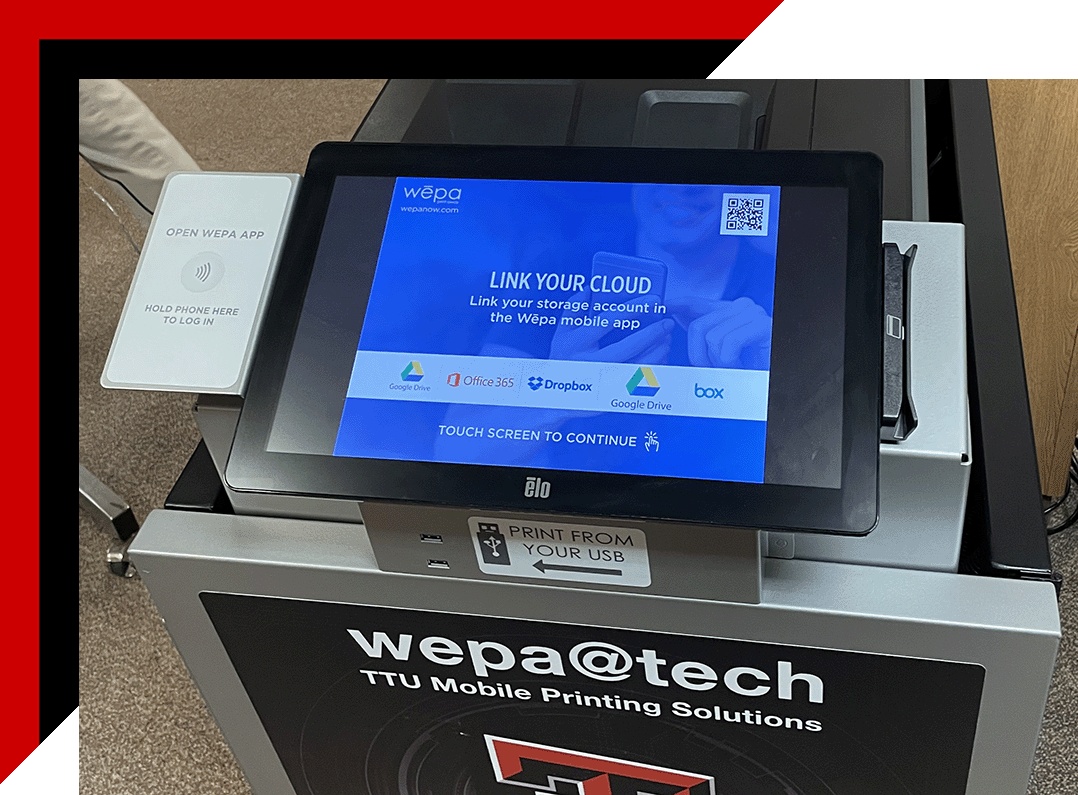
WEPA Kiosk

A new form of printing is making its debut in ATLC Main. WEPA™, Wireless Everywhere Print Anywhere, is a cloud printing environment that will be available across a network of wireless touch-screen printing kiosks. This pilot program will bring the latest innovations in distributed printing services to the TTU campus:

About WEPA™

What is WEPA™?

Pronounced wee-pah, WEPA™ is an acronym for "Wireless Everywhere Print Anywhere." WEPA™ is a breakthrough in Wireless Printing Technology. WEPA™ uses "cloud computing" to upload documents and send them via the web to WEPA™ "touch-screen" kiosks where students can then print their documents.

Why was WEPA™ developed?

WEPA™ is a printing service that was developed to meet the needs of schools and students by providing a user-friendly service and convenience that keeps students from being confined to a lab or library – the typical places that printers are found. WEPA™ kiosks can be placed anywhere (labs, libraries, dorms, cafeterias, etc.) to print documents and serve the printing needs of students.

How does it work?

Once registered, a student can upload a document from anywhere that internet service is provided. Then, go to the nearest WEPA™ kiosk and simply login, select method of payment, and print their document. Note: There must be an internet connection to upload documents to WEPA™.

What documents can I print?

You can upload and Print any document to WEPA™ such as PowerPoint presentations, Excel spreadsheets, Word documents, Text files, MAC files, or PDF files. You can also print image files from a USB drive.

Registering with WEPA™

WEPA™ registration is tied to your Texas Tech eRaider credentials, but you will need to visit the WEPA™ website to complete the initial registration.

Detailed help information will be available soon.

Paying for your WEPA™ Printing

Payment for the service will be via the Texas Tech University Raider Card system. You pay for your print at the WEPA™ kiosk at the time of printing using your Raider Card. Students can deposit funds via the TTU ID Office or through the University ID/Raider Card website.

Device Usage

You can print from mobile phones, laptops, desktops, or tablets, as long as you have internet access and the proper drivers installed on your device. After you've registered, drivers for PC and Mac are available on the WEPA™ website members area. Several training videos are available to assist with using WEPA™.

Can I use a "SmartPhone" to send documents to the WEPA™?

Yes. WEPA has released a Apple iOS app and Android app for mobile devices. Install the app for free from your mobile device by searching for the keyword "WEPA Print" from Google play or the app store.

How do I print from my iOS device?

To print from an iOS device, you will need to download the WEPA Print app for iPhone or iPad. More information is available on the WEPA™ website.

Additionally, owners of an iPad2®, iPhone®, or iTouch® (3rd generation) can now print without installing any software or drivers and get the convenience of WĒPA's network of printing stations. All you need is Internet access and you can use SkyPrint™ to send your documents to the nearest WEPA™ kiosk.

How do I print from my Android device?

To print from an Android device, you will need to download the WEPA Print app. More information is available on the WEPA™ website.

Can I print from a USB drive?

Yes. More information »

Print from your USB Jump-drive at any WEPA™ kiosk fast:

  1. Once at the WEPA™ kiosk, from the "Welcome" screen select "Print From USB"
  2. Insert your USB Jump-drive
  3. Select the file(s) you would like to print
  4. Select your method of payment
  5. Print your documents!

Locations

Currently, 4 WEPA™ kiosks are available in the ATLC Main (West Basement of the University Library).

ePrint

Is ePrint still available?

During the WEPA™ pilot program, ePrint will still be available in the following locations:

Can I still add funds to my ePrint account?

You may continue to deposit funds into your ePrint account at the ATLC Main during the WEPA™ pilot program. These funds will be available for use in the ATLC East, ATLC North, ATLC SUB, and ATLC West locations.