
Training & Resources
Finance New FOP System Manual
Table of Contents
- Finance New FOP System
- New FOP System Home Screen
- FOP Organization Maintenance
- Creating a New FOP Combination
- Change an Existing FOP Combination
- Organization Code Request
- Organization Name Change
- Terminate Organization Code
- Financial Manager Change
- Inbox (Approvals)
- Approvals
- Search
- Glossary
- Banner Program Codes
- Fund Descriptions
Finance New FOP System
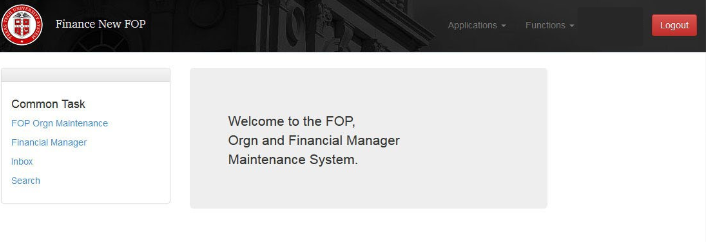
The Finance New FOP (Fund, Organization, Program) automated system is designed to add or make changes to FOP combinations, organization codes, and financial managers in an expedited and efficient manner with the convenience of predefined approval routing and history for audit purposes.
The system is located: https://newfop.app.texastech.edu
Questions regarding the Finance New FOP system may be directed to Accounting Services – Financial Systems Management (FSM) at accountingservices@ttu.edu.
New FOP System Home Screen
This screen offers users easy access through links to various features of the system.
From the home screen, a user may begin new FOP or Financial Manager requests, view their inbox or search for requests by type and status.
The ‘Applications’ dropdown allows users to toggle between different TTU/TTUS Financial Systems.
‘Functions’ and ‘Common Tasks’ display the same four items: ‘FOP Orgn Maintenance’, Financial Manager’, ‘Inbox’, and ‘Search’.
In addition, ‘Functions’ displays Program Descriptions for user reference in selecting applicable functional program codes and New FOP Fund Class and Program Code allowable combinations. Users are unable to modify this screen. It is for reference only.
FOP Organization Maintenance
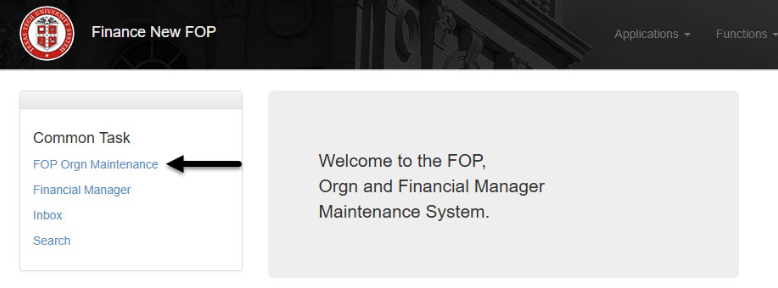
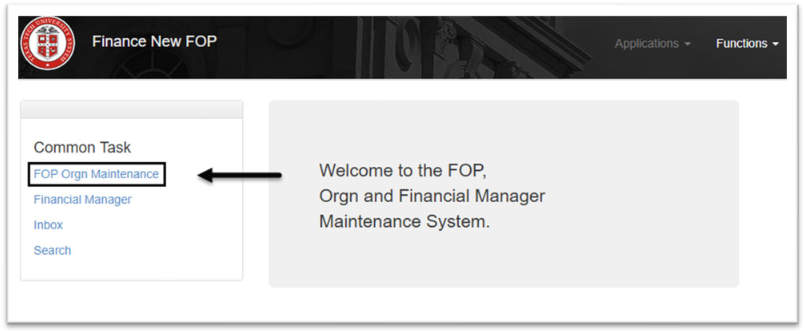
For FOP and Orgn maintenance actions, choose ‘FOP Orgn Maintenance’ from the home screen.
Creating a New FOP Combination
A fund financial manager often has multiple FOP combinations to allow organization financial managers to manage funding at a FOP level. After selecting the applicable ‘Chart’, choose ‘New FOP combination’ from the dropdown list.

To create a new FOP combination, enter a valid ‘Fund Code’, desired ‘Organization Code’ and ‘Program Code’.
Verify the requested FOP usage meets the description for the selected ‘Program Code’.
Enter the numeric value for ‘Projected percentage of research related expenses’.
Provide a detailed ‘FOP Objective and Reason for Request’ and ‘Additional Information’ that may provide approvers with any other pertinent data.
Effective Date is a new field added to the request page. On New FOP requests, the originator now has the option to select any date, prior, current or future.
Once all fields are completed, select ‘Save and Submit’ to move the request into approvals or ‘Save’ to return and submit at a later date.
The organization financial manager, Accounting Services fund accountant, and Financial Systems Management are required to approve all new FOP combination requests. Email notifications alert the originator and the approvers when action is required or completed.
Change an Existing FOP Combination
A financial manager may change an existing FOP Combination for reporting purposes or based on organizational needs. The existing FOP is invalidated once the new combination request is completed.
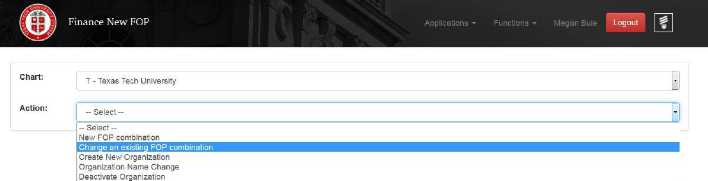
After selecting the ‘Chart’, choose ‘Change an existing FOP combination’.
To begin, type in a FOP. An error message is displayed on the right side of the page if an invalid combination is entered. This does not prevent you from saving the request, however, the error must be resolved prior to selecting ‘Save and Submit’.

If needed, FOP combinations may be verified using the FI106 – Valid FOP Report in Cognos.
All fields must be completed:
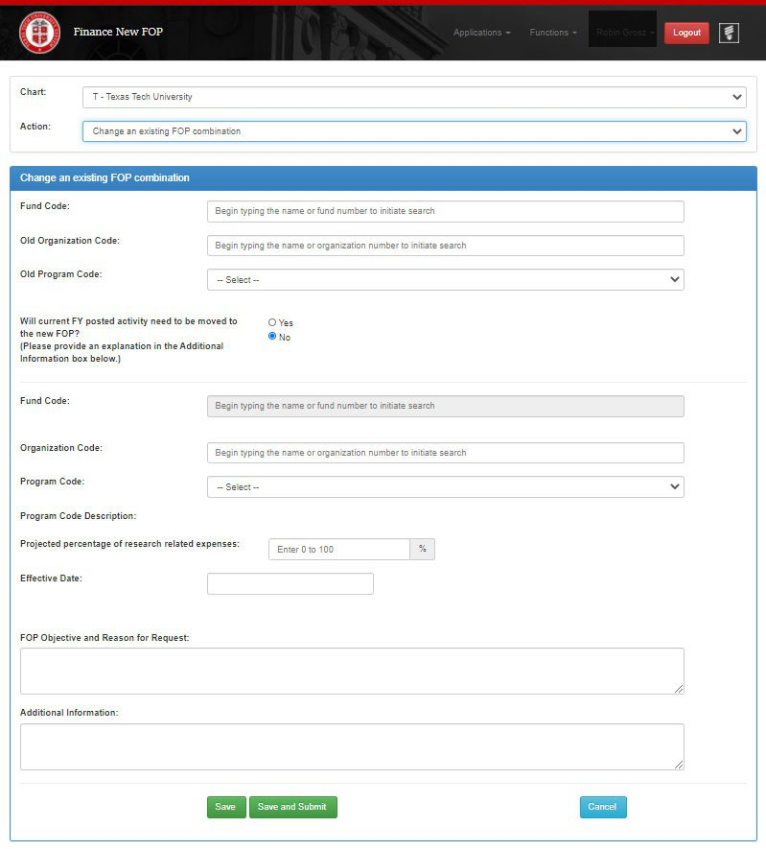
Effective date is a new field added to this request page. The originator now has the option to select current or future date.
Once all required information is entered, choose ‘Save’, ‘Save and Submit’, or ‘Cancel’.
Organization Code Request
The Finance New FOP system may be used to:
• Request a new organization code
• Change the name of an existing organization code
This is completed by choosing ‘FOP Orgn Maintenance’.
Create New Organizations
Organization codes are used for reporting, access and use management, or authorization purposes.
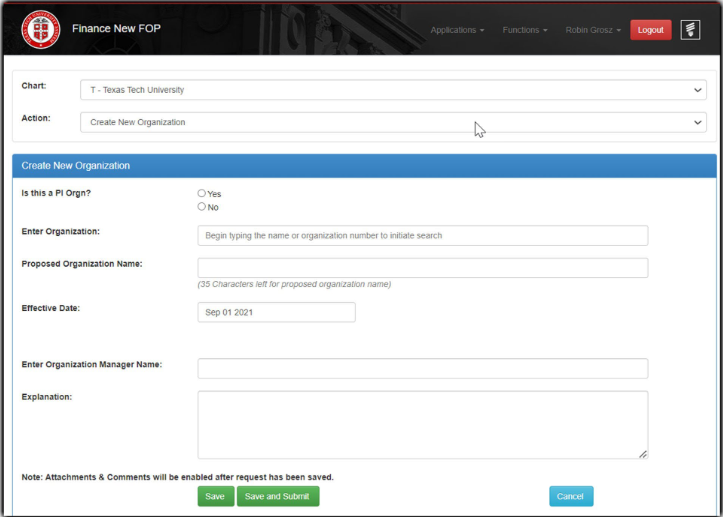
From the ‘FOP Orgn Maintenance’ screen, select ‘Chart’ and ‘Create New Organization’.

Complete the Following:
- Is this a PI Orgn?
- Yes, will allow orgn codes to be created and the PIORGN attribute is then added.
- No, continue below.
- Organization: department predecessor organization name and select from all active codes with this name. Or directly input the department predecessor code (usually alphanumeric).
- Proposed Organization: name for the new organization code that is being requested.
- Effective Date: the date defaults to the beginning of the FY and can be changed to any date within the FY.
- Organization Manager: name of the employee who will be the organization financial manager.
- Explanation: information regarding the new organization code. This may be the purpose of the request or the fund code it will be linked to.
Click ‘Save and Submit’ to route the request to the orgn manager for approval then to FSM for review and approval.
Organization Name Change
The Finance New FOP system is also used to change the name of an existing active organization code.
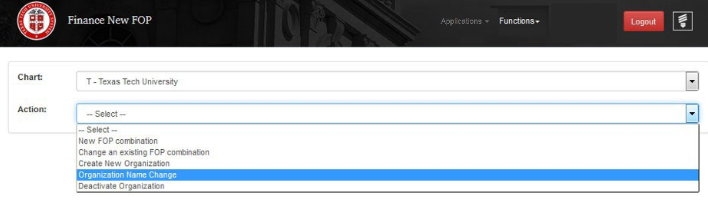
From ‘FOP Orgn Maintenance’, select the ‘Chart’. Choose ‘Organization Name Change’.
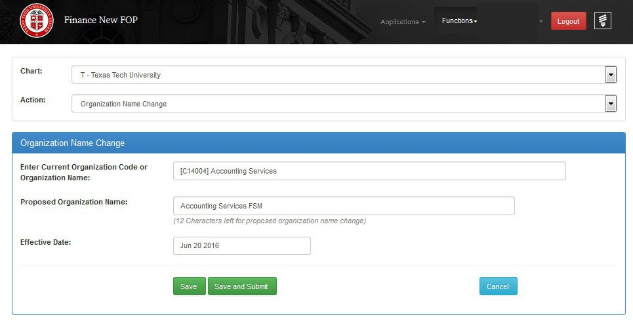
Complete the following:
- Current Organization Code or Organization Name: either the organization code or organization name.
- Proposed Organization Name: proposed new organization name.
- Effective Date: this may be current or future-dated only.
Click ‘Save and Submit’ to route the request to the organization financial manager for approval. Once approved, the request is reviewed and finalized by FSM.
Terminate Organization Code
Finance New FOP can terminate an organization code with all associated FOPs. This
option checks all budgets, fixed assets, encumbrances and all necessary
checks that are necessary prior to terminating an organization code.
From ‘FOP Orgn Maintenance’, select the ‘Chart’. Choose ‘Terminate Organization/FOP’.
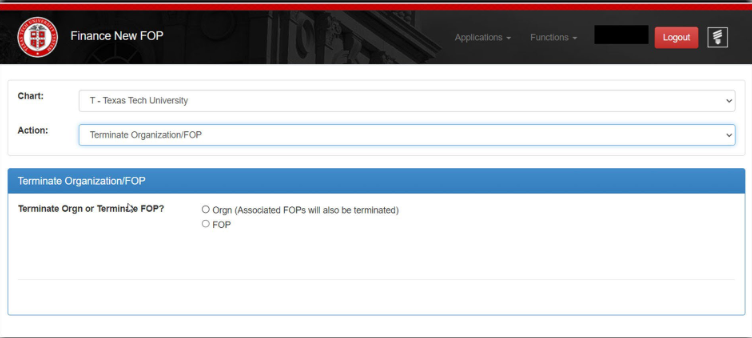
Select either Orgn or FOP. By selecting Orgn, all associated FOPs will be pulled into the request, these cannot be removed. If an organization code is terminated, all associating FOPs should be as well. By selecting FOP, only 1 FOP that is entered will be terminated.
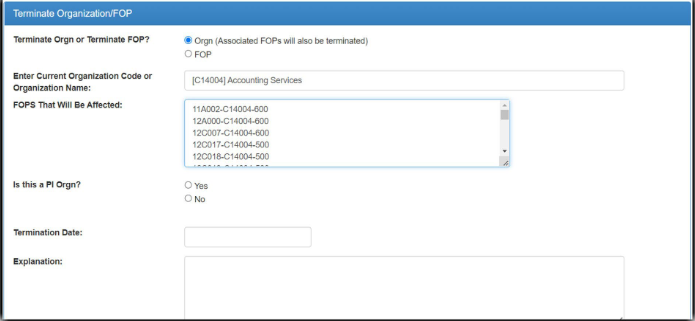
Select Orgn, enter the orgn to be terminated. All associated FOPs will be listed in the box directly under the orgn code. All PI Orgn codes are terminated only by Accounting Services. Include the effective date and explanation.
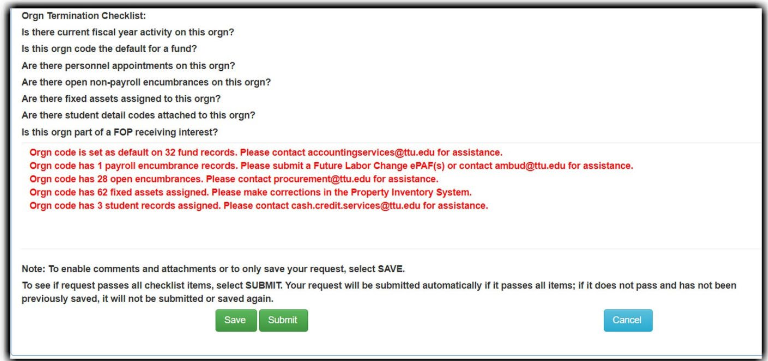
The checklist is listed within each request. When Submit is selected, New FOP will run through the checklist and list what checks did not pass along with who to contact for additional information or assistance. There is also a note at the bottom explaining that the SAVE button does not run the checklist but SUBMIT will run the checklist.
Terminate FOP
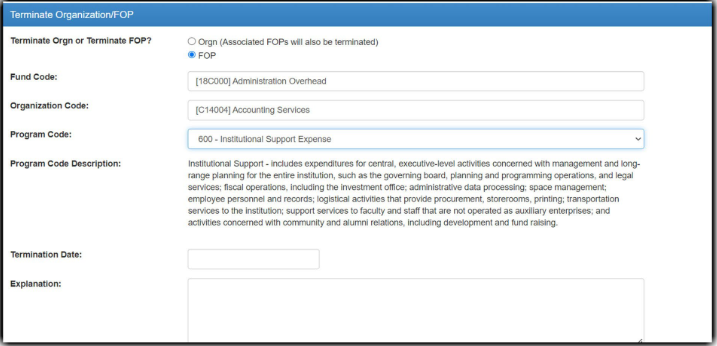
When selecting to terminate a FOP, fill in the information needed and hit SUBMIT.
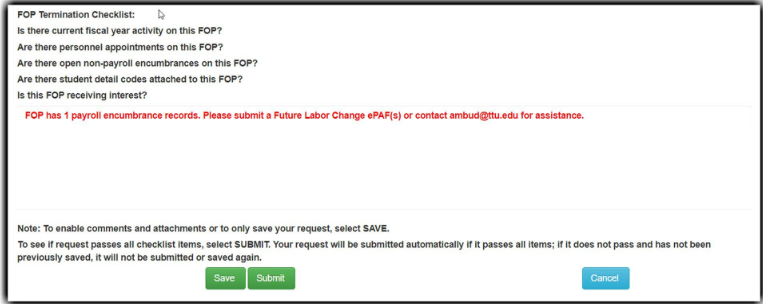
The checks are still done and the request will not pass until they are cleared.
Financial Manager Change
Financial Managers are assigned to funds and organizations. Sometimes these are referred to as Fund Managers or Orgn Managers. The Finance New FOP system allows users to request a change to the fund and/or organization financial manager.
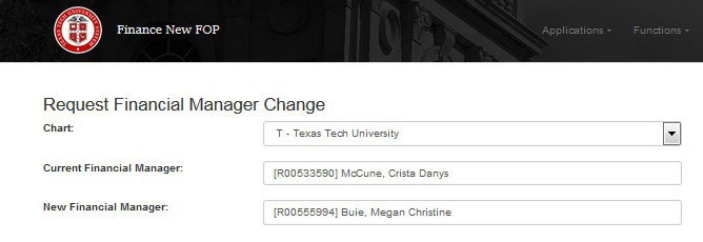
The financial manager may be changed by choosing ‘Financial Manager’ from the home screen

On the ‘Request Financial Manager Change’ screen, choose ‘Chart’. Type the name or R# of the current fund or organization financial manager followed by that of the new financial manager
**Note: Per TTU OP 02.08, “Endowment fund financial manager responsibility will be assigned to the vice president, the PSVP, dean, or equivalent level unless otherwise specified by the donor. The TTUS CFO will be the fund financial manager on all quasi-endowments”. This OP restriction covers funds beginning with 61 or 87.
The system then displays a list of funds and organizations associated with the current Financial Manager. Click the boxes next to the funds and/or organizations to be modified to the new financial manager. Use the ‘Select All’ toggle at the top of each section to select all fund or organization codes displayed.
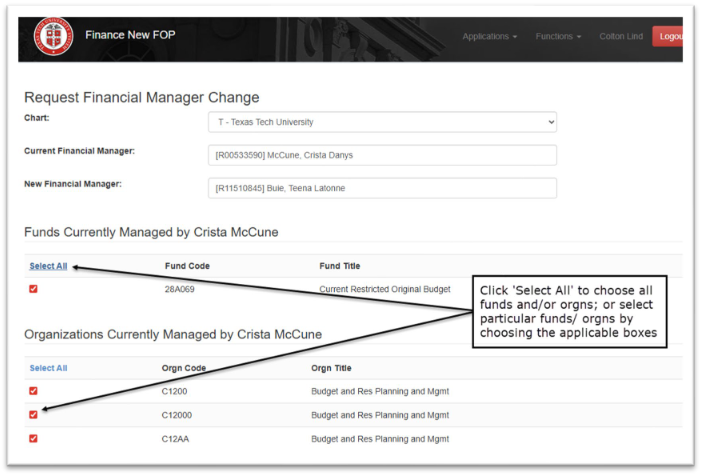
Next, scroll to the bottom of the screen, provide an explanation for the change and click ‘Save and Submit’.
The current and future financial managers, as well as FSM, are required to approve these actions.
Inbox (Approvals)
Approvers receive emails from the Finance New FOP system when a request is pending their review/approval. The email contains a hyperlink to the approver’s ‘Inbox’.
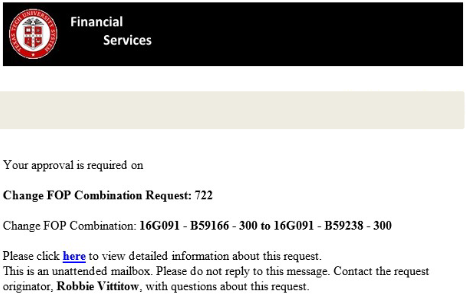
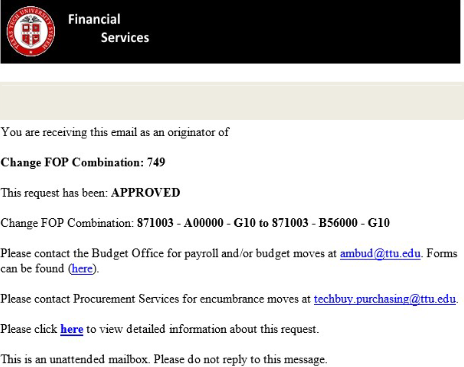
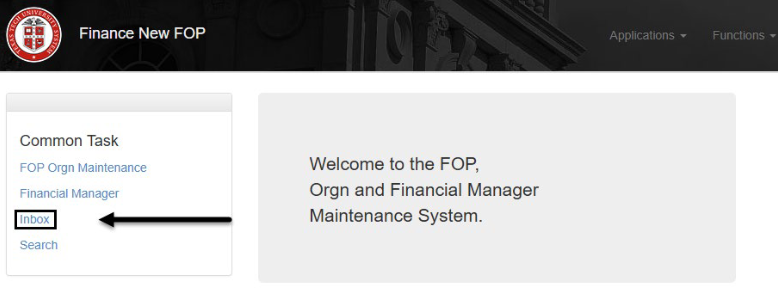
The ‘Inbox’ may also be accessed from within the Finance New FOP system by selecting the ‘Inbox’ on the home screen.
The ‘Inbox’ lists requests pending for the logged in submitter or approver. Click ‘Details’ to view the request.
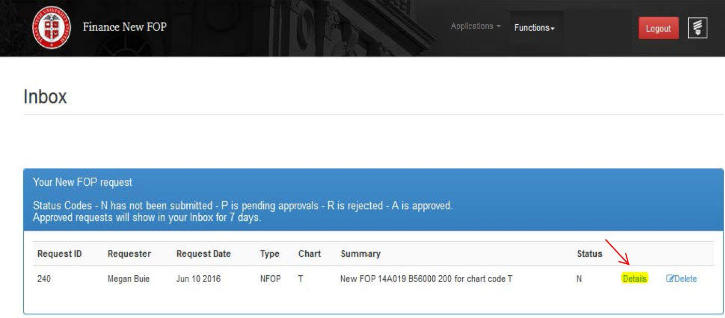
Once in the request, an approver may scroll through the document and either ‘Approve’ or ‘Reject’. Comments are required on a rejected request.
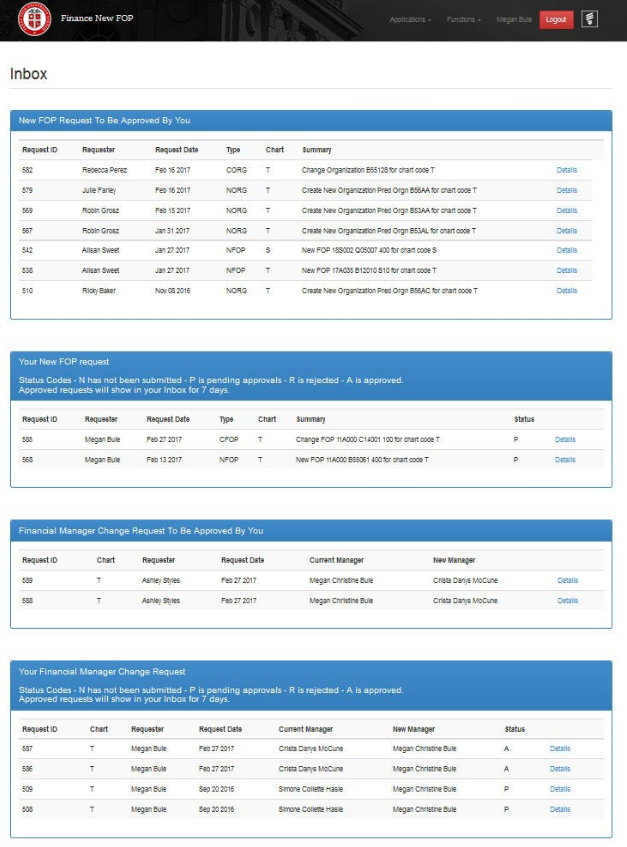
The ‘Inbox’ separates requests and approvals into categories:
- New FOP Request to Be Approved by You
- Your New FOP Request
- Financial Manager Change Request to Be Approved by You
Your Financial Manager Change Request
Approvals
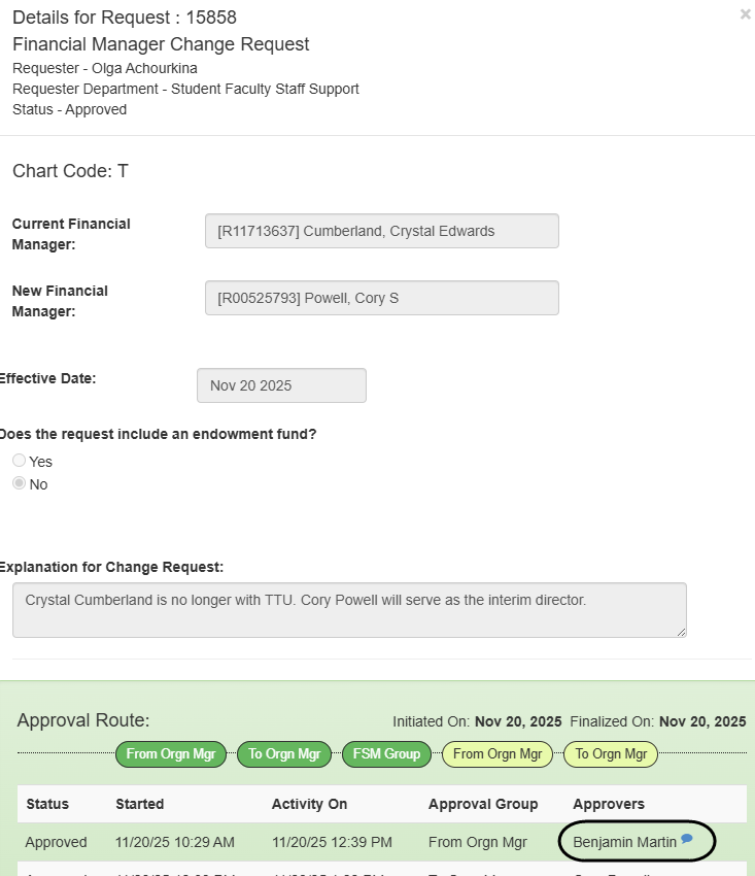
Approval routing and status may be found in the details of the request.
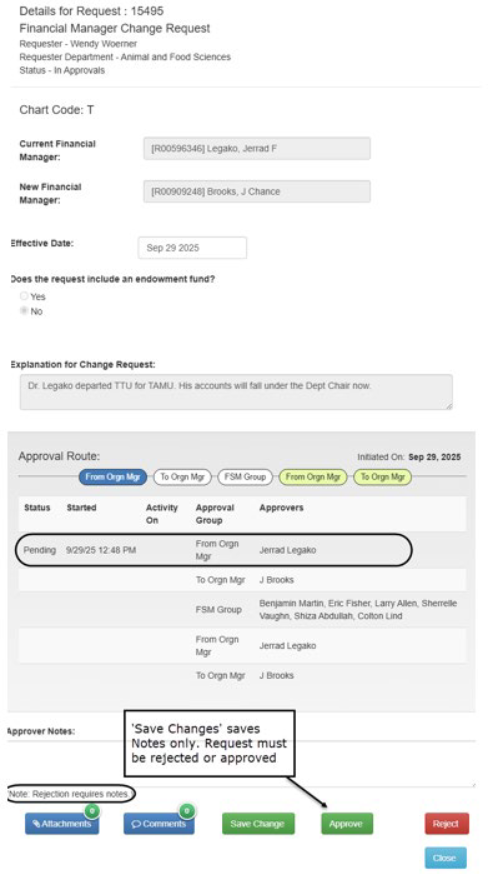
Double click blue comment bubble under Approvers to view a comment.
Search
The Search link on the Finance New FOP home screen may be used to find a submitted request.
Complete the following:
- Chart Code: Choose the appropriate chart of accounts.
- Request Type
- New FOP including organization code requests.
- Financial Manager, fund, or organization financial manager changes.
- Status:
- Approved – approved requests only.
- Error – requests with an error.
- New – requests submitted within the last 7 calendar days.
- Rejected – rejected requests only.
- Submitted – requests that have been submitted, but not approved or rejected.
- All – all requests regardless of status.

The system displays requests matching the specified parameters. Click ‘Details’ to view the request. ‘Delete’ cancels a request that has not been approved.
Glossary
- Alpha-numeric: consisting of or using both letters and numerals.
- Approver: financial manager or a designee as assigned in TeamApp.
- Chart Code: component initial; may be E (HSC El Paso), H (HSC Main), S (TTU System), or T (TTU); see Chart of Accounts.
- Chart of Accounts: a one-character, alpha field that uniquely identifies a particular chart; see Chart Code.
- Effective Date: the date when action takes place in Banner.
- Endowment: a donation of money or property to a nonprofit organization for the ongoing support of that organization. Usually, the endowment is structured so that the principal amount is kept intact while the investment income is available for use, or part of the principal is released each year, allowing the donation to have an impact over a longer period than if it were all spent at once. An endowment may come with stipulations regarding its usage.
- Financial Manager: an assigned employee with fiduciary responsibility for a fund or organization level. This person is assigned in Banner screens FTMFUND – Fund Financial Manager or FTMORGN – Orgn Financial Manager.
- Financial Systems Management: an area within Accounting Services responsible for access management, TTU/TTUS finance systems creation and maintenance, customer service, and technical support for the finance systems.
- FOP (Combination): a combination of Fund, Organization, and Program. A valid FOP has an FTMACCI record to allow for budgeting and use.
- FOP Orgn Maintenance: selection in the New FOP system for creating a new FOP combination, changing an existing FOP combination, creating a new organization, or changing the name of an organization.
- FTMACCI Index: the Banner table that allows FOP combinations to be created to validate usage.
- Functional Program Codes: segment of the Banner FOAP accounting string designed to identify the function of
the activity according to standard definitions developed by the National Association
of College and University Business Officers (NACUBO) for higher education operating
activity. The TTU/TTUS program codes are:
- 100 – Instruction
- 200 – Research
- 300 – Public Service Support
- 400 – Academic Support
- 500 – Student Services
- 600 – Institutional Support
- 700 – Operations and Maintenance
- 800 – Scholarships and Fellowships
- 900 – Unexpended Plant
- A10 – Auxiliaries
- E10 – Endowment Funds
- G10 – Agency Operations
- S10 – Service Departments
- Fund: a one- to six-character code that identifies a self-balancing set of accounts, defines where the money is coming from, and ownership. Fund codes may be established in a hierarchy of up to five levels for roll-up and reporting purposes. Examples include E&G 11–14, Current Unrestricted Funds 15–19, Sponsored Projects 21–23, and Endowments 87.
- Fund Accountant: Accounting Services staff responsible for assisting departments with financial transactions and other Banner Finance and Finance System assistance.
- Fund Financial Manager: an assigned employee with fiduciary responsibility for a fund. This person is assigned in Banner screen FTMFUND – Fund Financial Manager.
- Inbox: the location in the New FOP system for reviewing submitted requests and/or requests for approval.
- Invalidates: in FTMACCI, the FOP Combination becomes inactive and invalid, thereby restricted from use in financial systems.
- Organization: a one- to six-character code that identifies a unit of budgetary responsibility and/or departments within an institution. It is normally used to define who spends the money. Organization codes may be established in a hierarchy of up to eight levels for roll-up and reporting purposes.
- Orgn Financial Manager: an assigned employee with fiduciary responsibility for an organization. This person is assigned in Banner screen FTMORGN – Organization Financial Manager.
- Originator: person who creates a request using a finance system.
- Predecessor Organization: a segment of the organization code roll-up or hierarchy. This defines the department or level that will spend the money. Predecessors are used for reporting purposes.
- Program: a three-digit character code that identifies a function and enables the institution to establish a method of classifying transactions across organizations and accounts. Examples include Instruction, Research, and Plant Operations. Most institutions follow programs defined by NACUBO. Program codes may be established in a hierarchy of up to five levels for roll-up and reporting purposes.
- Quasi Endowment: a fund functioning as an endowment. These funds are earmarked by an organization's governing board, rather than restricted by a donor or outside agency, to be invested to provide income for a long but unspecified period. The governing board may decide at any time to expend the principal.
- Request Type: in New FOP system Search functionality there are two options:
- New FOP (includes organization changes)
- Financial Manager (for Fund and Orgn)
- Research Related Expenses: an expenditure of funds for which the use of the funds qualifies as research and development.
- TTUS CFO: Mr. James Mauldin.
- Valid FOP: a FOP combination which is found as valid and active in Banner table FTMACCI and may be verified using Cognos report FI106.
Banner Program Codes
Fund Descriptions
Accounting Services
-
Address
TTU Plaza Building, 1901 University, Suite 308, Lubbock, TX 79411 -
Phone
806.742.2985 | Fax: 806.742.8076 -
Email
accountingservices@ttu.edu