
Change Request Guide
What is a Change Request?
A change request is a modification to an existing purchase order (“PO”), modifications to the pricing, increasing the funds (ex., Shipping was omitted), changing accounting (“FOAPs”), decreasing funds (when a line item was canceled), or closing a PO. The change request is not intended to purchase additional items not included in the original PO. Procurement Services will review all change requests submitted and, upon review, may deny a change request that does not comply with procurement policies (See Operating Policy and Procedure 72.09), is not permissible on the funding type, or does not comply with this guideline.
How Do Change Requests Work?
The look and feel of the change request are similar to that of a requisition. If the modifications submitted on a change request are approved, these changes will update the PO in TechBuy and automatically feed over to Banner.
When is a New Order Required vs. a Change Request?
New Order Required:
- Purchasing new products/services
- Order substitutions
- Adding new components, products, or services that were not initially included on the original requisition and/or contract.
Change Request Required:
A change request is permitted when requesting to update the FOAP element or pricing on a purchase order in which an invoice has not been paid.
- Updating/changing the FOAP
- Updating the pricing (Example: Rental Car Reservation; PO was originally for two days, but a third day was required,
etc.)
- Please note: Any shipping charges that are greater than $250 or 10% of the entire order amount will require a change request. Shipping charges less than that amount do not require a change request.
- Decreasing/increasing a standing order (subject to OP 72.09)
Prohibited Changes and Limitations
- Changing the FOAP after the PO has been fully paid and closed
- POs that were closed in a prior fiscal year
- Changing the ship-to location
- Changing the vendor
- Updating a controlled account code to a capital account code or updating a capital account code to a controlled account code. (Example: 7J0 -> 7C0 or 7C0 -> 7J0)
- Canceling the PO (the vendor must be notified of the cancellation, and the user must submit an encumbrance release request to close the PO and release funds)
- FOAP changes are only allowed if the PO has not been invoiced
- If the PO has been invoiced, a change request cannot be completed, and a "cost transfer" must be submitted instead
- Please note that punch-out vendors have e-invoicing enabled, and they can submit their invoices much quicker than non-Punch-out vendors
How to Create a Change Request in TechBuy
To create a change request in TechBuy, users must locate the purchase order in the TechBuy system and select the "Change Requests" tab on the PO header document.

How to Update the Pricing on a Change Request
- Users must scroll down to the line items and select the line-item description to open the form/funding information. Users can then edit the amount and save the form/funding information.


- If the line item is a non-catalog item, the amount can be updated under the "Price Estimate Section."


How to Update the FOAP on a Change Request
Users can modify the FOAP on a change request by utilizing two methods. Each method should only be used when the change request meets these criteria.
How to Update the FOAP on a Change Request on a PO That Has Not Been Invoiced
Method 1: Updating the Line and Header FOAP Summary - Only preferred if the PO has not been invoiced. (Check the invoice tab on the PO to if an invoice has been created)


How to Update the FOAP on a Change Request on a Partially Invoiced PO
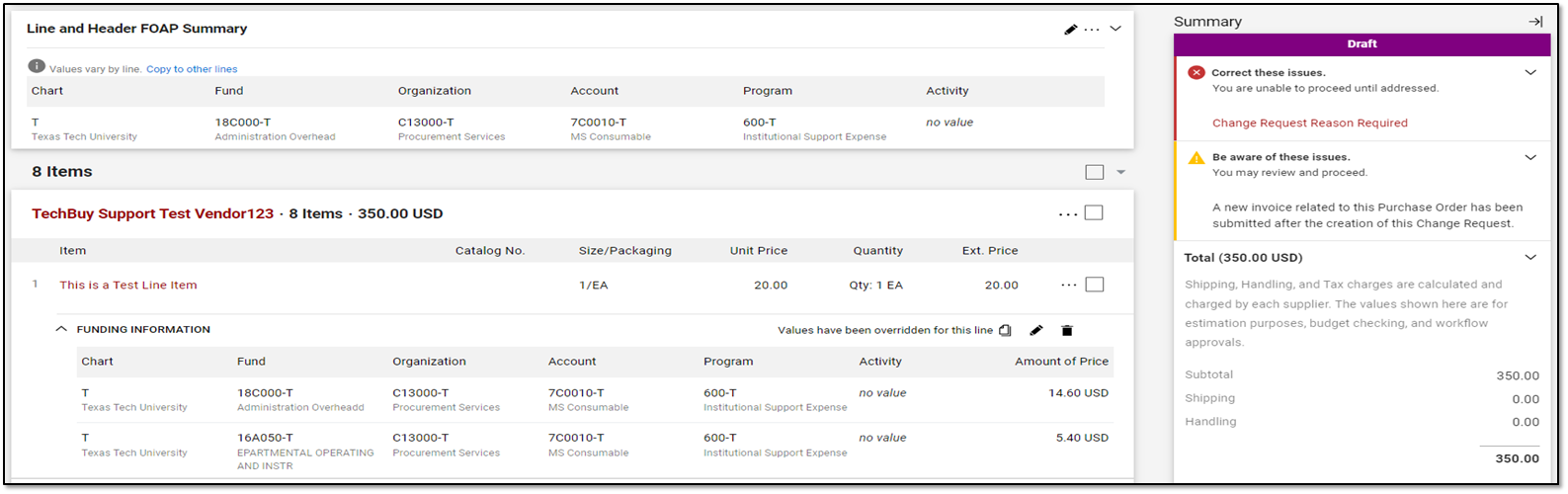
Method 2: Updating the funding information on the line items - preferred if the PO has been partially invoiced. (Check the invoice tab on the PO if an invoice has been created)

Example: this PO has been partially invoiced, which will require the end user to modify the "Funding Information" on the line-item. The original FOP, 18C000-C13000-600 was partially invoiced for $14.60. Therefore, only a $5.40 encumbrance remains on line item 1. FOP 2, 16A050-C13000-600, can only encumber the leftover amount. Therefore, a split on the line item must be made, and the original FOP must still be listed in the amount that was invoiced. Failure to leave the original FOP that was invoiced will result in the second FOP encumbering the entire line-item amount.
Common Change Request Errors
- Users changing the original FOAP information and replacing it with a new FOAP
- Submitting a change request without making desired changes
- Users must provide a detailed and justifiable change request reason, and must also update the documents to reflect their changes.
- Changing FOAPs on full or partially invoiced POs
- Any line items that have been fully or partially paid on a FOP must be left on the line item in the amount that was invoiced. If a new FOP is being added, it can only be the amount of what has not been invoiced/still encumbered
- Users not updating the "Accounting Date"
- The Accounting Date must be updated or the change request will fail
- Budget failures
- Users must verify the FOAP available budget before submitting a change request or they will experience budget failures on the PO workflow
- Changing the amount to only the "delta charge"
- Users who are looking to increase the amount on the line item must add the delta/new amount to the original amount. Users should never change the original amount to the requested delta amount. Example: Requesting to increase a $100.00 PO to $150.00. The line item should be updated from $100.00 to $150.00. It should not be updated from $100.00 to $50.00, as this only decreases your current encumbrance.
Procurement Services
-
Address
Box 41094, TTU Plaza, Suite 408, 1901 University Avenue, Lubbock, TX 79409-1094 -
Phone
806.742.3844 | Fax: 806.742.3820 -
Email
strategic.acquisitions@ttu.edu