
Guidelines for Using the Encumbrance Release System
The following guidelines are intended to assist individuals requesting to release a procurement-related encumbrance. The Procurement Services department has made every effort to ensure that the guidelines are in compliance with University Operating Policies and Procedures (OPs). However, in the event of a conflict between these guidelines and any OPs, the OPs shall prevail.
When to submit an encumbrance release request:
- The final invoice has been paid on a purchase order and any remaining encumbrance must be released
- The department needs to close the entire encumbrance on a purchase order that has
been canceled with the vendor
- NOTE: For AquaOne or copier POs, do not submit encumbrance release until the final invoice has been paid by Payment Strategies. Please note that it may take 30 days or more to send the invoice for services completed in the previous month. For example, an invoice for services completed in August may not be sent by the vendor until late September.
When an encumbrance release request is not appropriate:
- When needing to release the encumbrance of select line items, but not the entire PO (a TechBuy change request should be submitted instead)
- When needing to increase or decrease encumbrance amounts (a TechBuy change request should be submitted instead)
- When needing to close an encumbrance with a balance of $0. This occurs automatically each month
- When the final invoice has not been paid yet by Payment Strategies
Submitting an encumbrance release request:
1. Click the "New" tab to create a new transaction
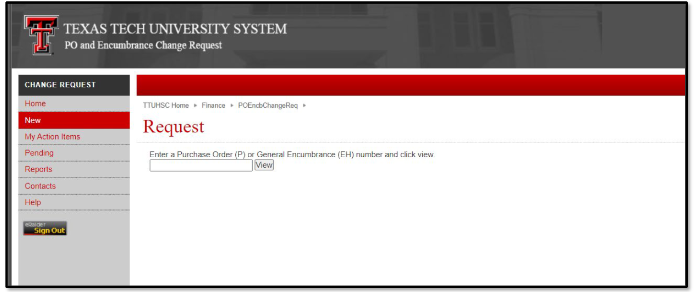
2. Enter the Purchase Order ("PO") or encumbrance number in the search box and click "View"
3. This screen details the original amount of the PO, any adjustments made, any liquidations (payments) made, and the outstanding (open) balance as of the previous business day. A transaction may have been liquidated, but not closed. The automatic batch closure will close any PO with a balance of $0 on a monthly occurrence.
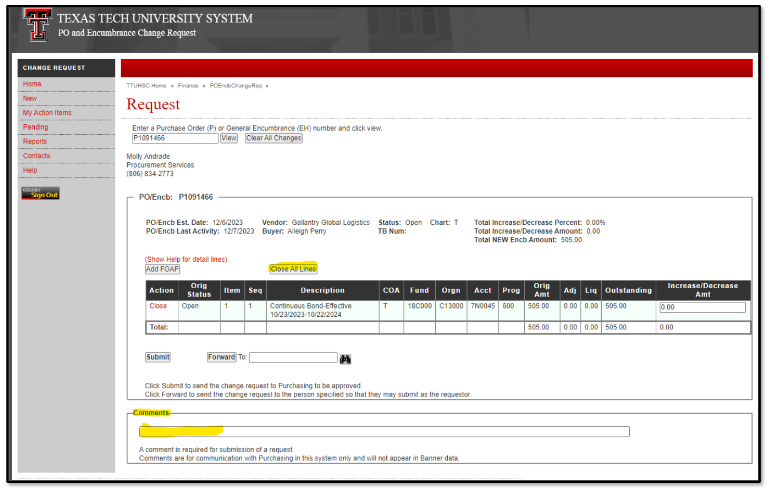
4. Select "Close All Lines", enter a detailed comment for the request reason, and select "Submit" to route the request to the Procurement Services Office.
NOTE: The preparer must enter a comment for review. Please detail why the close is required. A close request may be rejected if there is a contractual obligation remaining.
5. Most closes should process within 1-5 business days. For questions about any encumbrance release, please email strategic.acquisitions@ttu.edu
Procurement Services
-
Address
Box 41094, TTU Plaza, Suite 408, 1901 University Avenue, Lubbock, TX 79409-1094 -
Phone
806.742.3844 | Fax: 806.742.3820 -
Email
strategic.acquisitions@ttu.edu