
Adding or Removing Shoppers, Requestors, or Approvers
The following guidelines are intended to assist individuals entering requisitions for memberships in TechBuy. Procurement Services has made every effort to ensure that the guidelines comply with TTU Operating Policies and Procedures (OPs). However, in the event of a conflict between these guidelines and the OPs, the OPs shall prevail.
Financial Managers:
- A financial manager is a TTU or TTUS employee currently a Level 7 Organization Financial Manager who has authority and oversight of an organization code.
- A financial manager has unlimited account approval authority (up to the budgeted amount for that fund and organization code)
- Financial managers will be responsible for assigning TTU employees/student workers as approvers and requestors for using specific FOPs in TechBuy and other financial systems (Emburse Enterprise, PCard, etc.) and removing their permission should there be a personnel change.
- Financial managers may also register shopper roles. The shopper may shop in TechBuy but does not have any approval authority.
- Financial managers will also be responsible for complying with TTU budgets and spending funds for intended purposes, including any grant requirements.
- Only one financial manager is allowed per organization code. To request a change to the current organization financial manager, please access the Finance New FOP application through Raiderlink.
Requesting Access to TechBuy and Finance Security Request:
- The financial manager for each organization access must register users (approvers, requestors, and shoppers) to their organization code via the TeamApp (Financial Security Authorization).
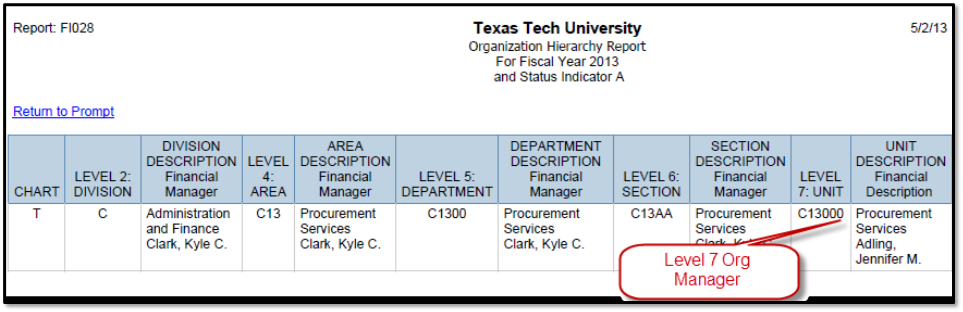
- The financial manager level is available in the Cognos Finance Report FI028 (sample below).
- The authorization site is through the TEAM Application or the TeamApp link on Raiderlink under the A&F Work Tools Tab in the DMFR section.
Instructions for Signature Authority Authorization for Approvers, Requestors, and Shoppers:
- The financial manager must log in through the TEAM Application
- Choose "Access Request" from the list on the page's left side
- Choose "Financial Security Request"
- Enter the eRaider User ID for the user you request permission for. NOTE: If you do not know the eRaider ID, you may click "Search for eRaider ID"
- From the "Financial Role" screen, select a role based on the level of approval you are granting the user.
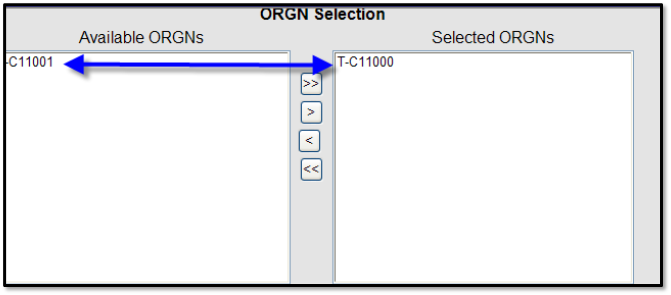
- From the ORGN (or Selection screen), move the Available ORGNs to the Selected ORGNs using the arrow keys. This may also be used to remove authorizations. NOTE: Organization selected allows authorization to all FOPs related to the selected organization code.
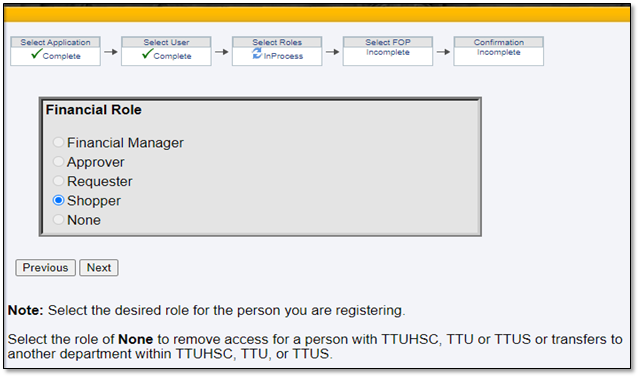
- Approver - A TTU(S) employee given authority for specific organization codes and their related
FOPs by the financial manager.
- This role has unlimited FOP approval authority (up to the budgeted amount for that FOP).
- Approvers will be responsible for complying with TTU Operating Policies and Procedures, budgets, and spending funds for intended purposes, including grant requirements.
- An approver will have the authority to register shoppers in TEAM app.
- Financial managers may assign up to three approvers per organization code.
- A TechBuy training class is required for approvers prior to obtaining access to the TechBuy system. Registration for the class can be found on Cornerstone.
- Requestor - A TTU(S) employee who has been given permission in TechBuy to shop and approve purchase
requisitions in TechBuy for specific organization codes and their related FOPs. (This
role applies to TechBuy only).
- This role has FOP approval authority up to $5,000.
- Any transaction greater than $5,000 from an individual with this role will go to a higher authority (approver or financial manager) for approval.
- Financial managers may assign up to three requestors per organization code.
- Approvers will be responsible for complying with TTU Operating Policies and Procedures, budgets, and spending funds for intended purposes, including grant requirements.
- A TechBuy training class is required for requestors prior to obtaining access to the TechBuy system. Registration for the class can be found in Cornerstone.
- Shopper - This role has no spending authority; all requisitions will route to the financial
manager, approver, and if applicable, the requestor for approval. (This role applies
to TechBuy only.)
- A TechBuy training class is required for shoppers prior to obtaining access to the TechBuy system. Registration for the class can be found on Cornerstone.
- None - This role selection allows the financial manager to remove any previously assigned authority from a user.
Change an Existing Role:
- To change an existing role on specific organization(s), the financial manager must select the individual's current role and move to the organization codes from the Selected ORGNs column to the Available ORGNs column. This will remove the user from their role on the organization codes that were moved.
- Once the change has been submitted, the financial manager should log back into the Team Application and choose the new role for the user. The organization code of the user's new role must then be moved from Available ORGNs to Selected ORGNs. Once the request has been submitted, the user will have a new role under the organization codes listed under the Selected ORGNs column.
Financial Profile Reports:
- Log on to TeamApp
- Choose "Reports" from the list provided on the left side of the page
- Click on "Financial Profile Access Report"
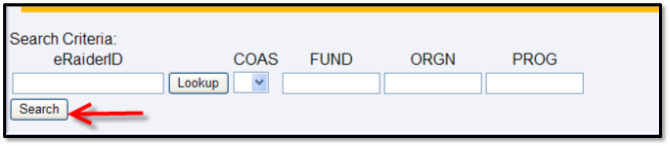
- Enter an Organization to look up to a specific organization code (remove eRaider ID) OR enter the eRaider User ID for information associated with that user. NOTE: If you do not know the eRaider ID, you may click "Search for eRaider"
- Click on Search
- Search results will provide all information associated with either the eRaider ID
or organization code
-
-
- Chart-Organization
- Financial Manager
- Approver
- Requestor
- Shopper
-
-
Procurement Services
-
Address
Box 41094, TTU Plaza, Suite 408, 1901 University Avenue, Lubbock, TX 79409-1094 -
Phone
806.742.3844 | Fax: 806.742.3820 -
Email
strategic.acquisitions@ttu.edu