
Texas Tech University

Add/Delete Driver(s) for Fuel Purchases


Our Mission

Operations Division provides building and service environments conducive to achieving the highest standards of excellence in teaching, research, and public service activities while meeting our own needs for well-being and professional development.

Your Prox# is located on the back of your Raider ID card.
To locate your R# it will be the number on the front of your ID card beginning with R.
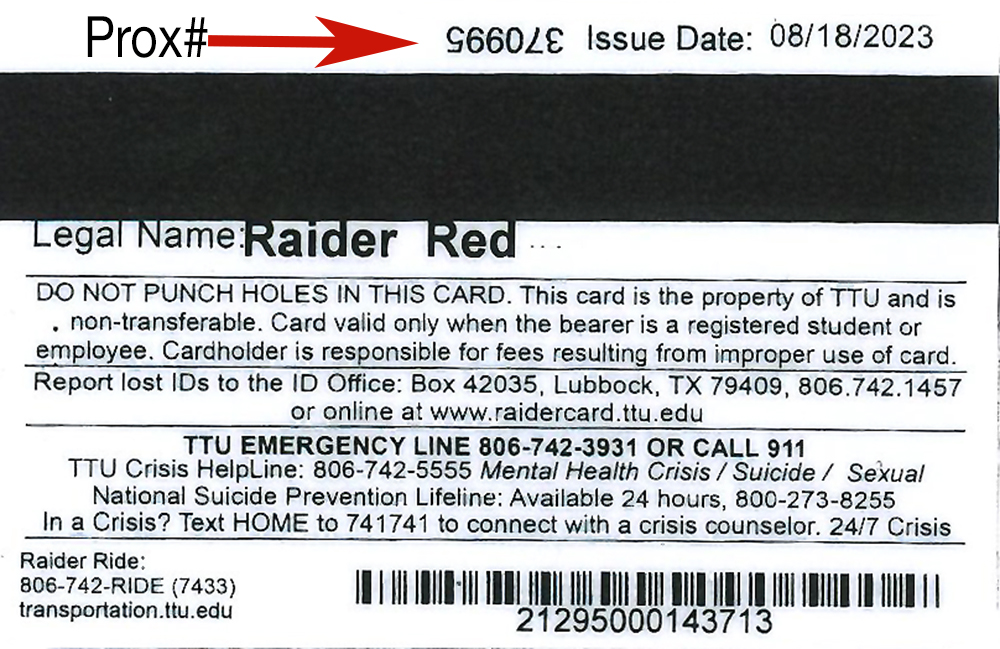
ID Card Back

terms and agreements

By clicking on the check box below, I agree to the following terms and conditions of Texas Tech OP 80.05.

*I Agree
department information
Please enter the Department's name.
Please enter your department's FOP.
requestors information
Please enter your first name.
Please enter your last name.
Please enter your email address.
Please enter your job title
Please enter your phone number.
Please enter the name of your Vehicle Coordinator.
driver's information

INFORMATION FOR DRIVERS BEING ADDED/DELETED:

Please provide the Driver's R#
Please enter the Prox#.
Please enter the Driver's First Name.
Please enter the Driver's Last Name.
*Add/Delete
Please enter the Driver's R#.
Please enter the Prox#.
Please enter the Driver's First Name.
Please enter the Driver's Last Name.
Add/Delete
Please enter the Driver's R#.
Please enter the Prox#.
Please enter the Driver's First Name.
Please enter the Driver's Last Name.
Add/Delete
Please enter the Driver's R#..
Please enter the Prox#.
Please enter the Driver's First Name.
Please enter the Driver's Last Name.
Add/Delete
Please enter the Driver's R#.
Please enter the Prox#
Please enter the Driver's First Name.
Please enter the Driver's Last Name.
Add/Delete


Operations Division: Services