
Fuel Station Instructions
Vehicles Equipped with a Fuel Chip
Important: If the vehicle has a fuel chip installed, do not manually enter the license plate number.
-
-
-
- Insert the fuel nozzle into the vehicle's fuel tank.
- The fuel terminal will display: "Vehicle Accepted, Please present Driver for Pump (X)".
- Scan your RaiderCard employee ID badge.
- The terminal will display: "Please Fuel".
- Lift the pump handle and begin fueling.
-
-
Vehicles Without a Fuel Chip (Using a License Plate Number or Vehicle Code)
-
-
-
- Scan your employee ID badge at the fuel terminal.
- The terminal should display: "Driver Detected, Present Vehicle".
- If it displays "Driver Not Detected", contact your supervisor. An Add/Delete Driver Form must be submitted.
- Press the ID button and enter the vehicle's License Plate Number or Assigned Vehicle Code.
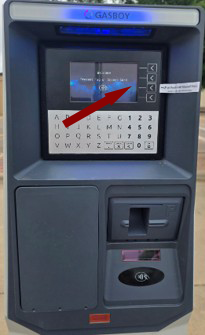
- If prompted, enter the pump number and press OK.
- The terminal will display: "Please Fuel".
- Lift the pump handle and begin fueling.
- Scan your employee ID badge at the fuel terminal.
-
-
Need Assistance?
If you experience issues with badge access, vehicle recognition, fuel chip operation, or pump functionality, please contact Fuel Services inside the office in front of the Pumps.
Reminders
- Always use your own employee ID badge.
- Verify the correct vehicle information before fueling.
- Report any equipment issues immediately.
- Return the nozzle securely to the pump after fueling.
- Hang the hose at diesel after each use.
Operations Division: Services
-
Address
Mail Stop: 3142, 3122 Main Street, Lubbock, TX 79409 -
Phone
806.742.4677 -
Email
operations@ttu.edu